
Coding can be really annoying. I mean it’is frustrating. You sit there for hours trying to figure out why your code will not work. Then you find out you forgot to include one semicolon in your code. This has happened to me a lot of times with my coding.
That is where Codex comes in. If you do not know what Codex is yet, get ready because Codex is pretty amazing. At Technical Dudes, we play around with technology tools all day, so let me tell you what is really going on with Codex in 2026.
What Exactly Is OpenAI Codex?
OpenAI Codex is a computer program that makes code for you. It is like a tool that helps you. You write what you want OpenAI Codex to do in language, and OpenAI Codex makes real code that works. You type something. OpenAI Codex generates code that you can use. OpenAI Codex is really good at making code for people.
It’s made by OpenAI — the same folks who built ChatGPT. But unlike ChatGPT, which does general conversations, Codex is specifically trained on programming. It learned from billions of lines of publicly available code on GitHub, Stack Overflow, documentation sites, basically everywhere programmers hang out online.
Here’s a real example: I typed “make a countdown timer starting from 60 seconds” last week, and it gave me complete HTML and JavaScript code. Worked on the first try. No debugging needed.
The technical explanation? Codex uses something called the GPT model, but specifically tuned for understanding and generating code. When you give it instructions, it predicts what code would solve your problem based on millions of examples it’s seen before.
But forget the technical stuff — what matters is that it actually works.
What Changed in 2026?
Codex got some pretty solid updates this year. Let me break down what actually matters:
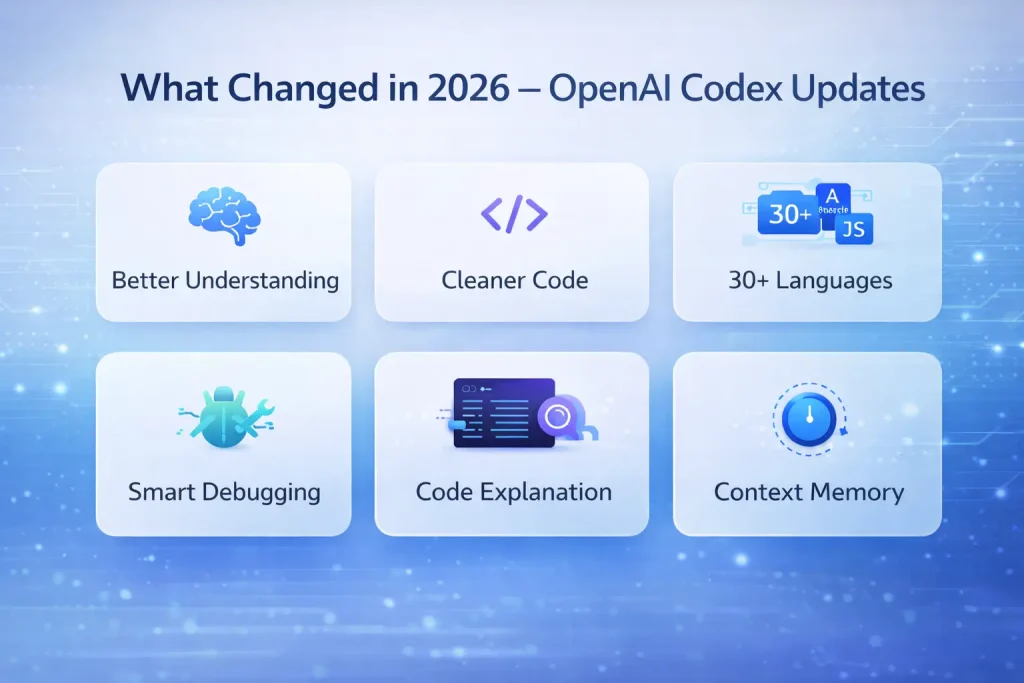
Way Better at Understanding You: Remember when you had to be super precise with instructions? Not anymore. I literally told it “yo make this look nicer on mobile,” and it figured out I wanted responsive CSS. The natural language understanding jumped up big time.
Cleaner Code Output: The code it generates now is way cleaner. Better variable names, proper comments, follows standard practices. Last year, it would give you working code that looked messy. Now it looks like something an experienced dev would write.
More Programming Languages: Always did Python and JavaScript well. But now? It handles 30+ languages, including old legacy stuff. My friend who maintains COBOL systems (yeah, those still exist) uses Codex regularly now.
Debug Mode is Legit: This is probably the biggest upgrade. Your code breaks? Show it to Codex, and it’ll tell you what went wrong, fix it, AND explain why it happened. Used to spend an hour hunting bugs. It now takes maybe 5 minutes.
Code Explanation Feature: Point at any confusing code block and ask, “What does this code block do?” The code explanation feature will then explain it to you line by line in English. I think the code explanation feature is super helpful when you are working with someone on messy code, and you need to figure out what the code is doing.
Actually Remembers Context: Working on a bigger project? It remembers what you’re building during your session. Don’t have to re-explain your entire app structure every single time you ask for something new.
Individually, these don’t sound huge. But when you use Codex daily, you really feel the difference.
How Does This Thing Actually Work?
Without getting too nerdy about it, Codex learned patterns from millions of code examples. When you ask the system to do something, the system is matching your request against patterns the system has seen in all that training data.
Think of the system like this: After watching one thousand cooking videos, you must know how to make basic pasta without looking at a recipe, right? Same concept but with programming. You type: “create a button that changes color when clicked”
Codex processes: Okay, they want HTML for the button, CSS for colors, JavaScript for the click event
It generates a complete code for all three parts with comments explaining each section
Sometimes it gets things wrong. The logic might be off, or it uses an outdated method. That’s why you still have to review everything it makes. But for basic to medium tasks, the success rate is pretty high.
Who’s Actually Using Open AI Codex?
People Learning to Code: My younger cousin just started learning Python. Codex helps her understand concepts way faster than any tutorial. When she gets stuck, instead of spending hours frustrated, she asks Codex and keeps moving.
Regular Developers: Even senior devs at my company use it. Not because they can’t code (they definitely can), but why waste time writing the same boring stuff over and over? Database connections, API calls, basic CRUD operations—let Codex handle that repetitive junk.
Startups: Small companies are building products way faster now. What used to need a team of 5 developers, maybe 2-3 people can handle with Codex helping out.
Students: CS students use it for assignments. Though honestly, professors are catching on and making assignments that need more thinking than just code generation.
Pricing in India
Open Ai Codex is now part of GitHub Copilot, costing around ₹850 monthly for individuals. Students and people who work on open-source projects can have it for free. Companies have to pay around ₹1,600 for each user every month.
Worth it? If you code regularly, probably yes. The time saved pays for itself in days. Occasional coders might prefer free alternatives.
Real Limitations of open Ai Codex
Makes Mistakes: Generated code sometimes has bugs. You still need to review and test everything.
Security Issues: It might suggest code with security problems. Never blindly trust it for sensitive apps.
Not Creative: Great at standard problems but struggles with completely new challenges needing creative thinking.
Needs Clear Instructions: If you are not specific about what you want, you will get a result that’s not very helpful.
Internet Required: This is a problem if you usually work without the internet because it will not work when you are offline.
Should You Actually Use It?
If you write any code at all, yeah, try it. The free trial lets you test without risking money.
Use it for:
- Repetitive boilerplate code
- Learning new frameworks quickly
- Debugging help
- Understanding unfamiliar code
- Speeding up prototyping
Don’t use it for:
- Complete replacement of learning
- Security-critical code without review
- Complex unique problems
- Production code without testing
The key is balance. Let it handle boring stuff so you focus on interesting problems. But don’t let it become a crutch where you can’t code without it.
Conclusion
The Open Ai Codex in 2026 is really good. It is not perfect. It is good enough that millions of developers use the Codex every day. The updates this year made the Codex really good at understanding what people want and generating code that actually works.
If you are just starting to learn how to code or if you have been coding for years, you should definitely check out the Codex. The time you save by not having to do things over and over again and by not having to debug as much makes the Codex worth using.
You should just use the Codex as a tool to help you, not as a replacement for your coding skills. The Codex is an example of how technology is getting better at helping us work in a smarter way. The Codex is an assistant that can make your life easier, so you should use the Codex to your advantage.
Frequently Asked Questions
What programming languages does Codex support?
Python, JavaScript, TypeScript, Ruby, and Go work best. Also handles Java, C++, PHP, Swift, and 20+ others pretty well.
Will Codex replace programmers?
Nope. It makes programmers more productive but can’t replace human creativity, problem-solving, and understanding of business requirements.
Can I use generated code commercially?
Yes, whatever Codex generates is yours to use however you want, including commercial projects.
How accurate is the code?
Maybe 70-80% correct on the first try for simple tasks. Complex requests need more editing. Always test everything.
Does it work without internet?
No, it requires an internet connection since it runs on OpenAI’s cloud servers.